TwInbox Frequently Asked Questions
General
Why do I get the "basic authentication not supported" error?
Twitter disabled an old authentication mechanism - Basic Authentication. Only OAuth is supported now. Please download and install the latest version
of TwInbox which supports OAuth.
What happened to OutTwit?
TwInbox used to be known as OutTwit. As the product matured, we have decided that a little "rebranding" was in order :).
"OutTwit" was a very good name. We hope that you like "TwInbox" just as much.
Functionality
If I start typing a new Tweet and Alt-Tab away from Outlook, the typed text disappears. Why?
Unfortunately, this is an Outlook limitation. That is how this particular Outlook's control works. You will see the same behavior
in other places using this control, such as Outlook's standard "Find a contact" field.
How do I group tweets from a specific set of Tweeterers in its own folder?
TwInbox's "Search/Group" functionality can be used to put tweets from groups of Tweeterers into their own folder.
For example, to create a folder with tweets from users "user1", "user2" and "user3", you can create a TwInbox
search with the following condition and assign it to its own Outlook folder -
"from:user1 OR from:user2 OR from:user3".
See this page for an example on how
to define a group of tweets from selected senders or matching a certain topic
.
Alternatively, you can use Search Folders to define group views.
I follow many people and my Tweets pile up too quickly. What can I do to manage tweets more effectively?
One of the nice things about pulling your Tweets into Outlook is that you
can use the full power of Outlook for managing tweets.
For example, you can:
- Create SearchFolders to display only tweets from particular senders, or only tweets that contain a particular word, or match any other criteria supported by Outlook filters. Information on using Outlook Search Folders.
- Use Outlook's AutoArchive functionality to delete tweets older than a certain number of days.
- Use Outlook's search (or any other search product that indexes Outlook messages) to search your tweets.
Outlook is a very powerful tool - take advantage of its power and flexibility.
How do I automatically remove old tweets from Outlook?
You can do that using Outlook's AutoArchive functionality. To enable it:
- Right-click on a folder
- Select Properties
- Click on the AutoArchive tab
- Specify the retention settings for this folder
I run TwInbox on two different machines. Why do I see duplicate tweets in my Exchange Twitter folders?
Each instance of TwInbox fetches tweets independently from the others. You can use one of the following two workarounds:
- Configure only one TwInbox instance to fetch new tweets.
- Store tweets in a local PST on each computer.
Does TwInbox support multiple accounts?
Yes, TwInbox does support multiple accounts. To add another account, click on "Options" under TwInbox drop-down, then click "Add Account".
Does TwInbox support proxy servers?
Yes, TwInbox uses Internet Explorer proxy settings. So if you configure IE to go through a proxy server, TwInbox
will pick up those settings. In most cases, if you are able to access twitter.com using IE, TwInbox should work as well.
How do I send a direct message or a reply using TwInbox?
To send a direct message, simply start your message with
d username
or hit Outlook's "Reply" button (Ctrl+R hotkey also works).
To send a reply, start your message with
@username
or hit Outlook's "ReplyAll" button (Ctrl+Shift+R hotkey works as well).
In what folders does TwInbox store my messages?
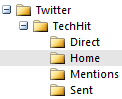 By default, TwInbox creates several subfolders under the folder you specify for storing messages. If you expand that folder, you will see
subfolders for each of your Twitter accounts, and under those, you will see subfolders for Home, Mentions, Direct and Sent messages.
By default, TwInbox creates several subfolders under the folder you specify for storing messages. If you expand that folder, you will see
subfolders for each of your Twitter accounts, and under those, you will see subfolders for Home, Mentions, Direct and Sent messages.
If you prefer to have all tweets stored in the same folder or separate folders created for each sender, you can configure that on the
Preferences tab of the Account Options dialog. (Click Edit Account to access that dialog).
What to do when I see the "Unable to reach Twitter servers" error?
Usually this error happens due to limited network connectivity or problems with Twitter servers.
- Check that you are connected to the Internet and are able to browse the web.
- Check that you are able to use Twitter via Internent Explorer (IE). TwInbox uses Internet Explorer proxy settings. If you are using a different browser as your default, IE may not be configured with the right proxy settings. If this is the case, specify the right proxy settings in IE options.
- Check status.twitter.com for recent issues with the Twitter service.
TwInbox stopped fetching updates, what should I do?
- First check that you are connected to the network and IE is configured properly (See the previous FAQ).
- Try to restart Outlook and see if that helps.
- If the above does not help, reboot your computer.
Does TwInbox support keyboard shortcuts?
Yes, it does.
- Compose a new tweet - configurable on the UI tab of the Options dialog.
- @Reply - hit Ctrl+Shift+R (same as Outlook's ReplyAll command).
- Direct message - hit Ctrl+R (same as Outlook's Reply command).
Is there a way to adjust the width of the message entry field on the TwInbox toolbar?
Yes, follow these steps (requires version 0.4.2.26 or later):
- Close Outlook.
-
Set the desired width by changing the following registry value (be sure to use Decimal mode) -
Key: HKEY_CURRENT_USER\Software\TechHit.com\TwInbox\Options
Value: TBMessageFieldWidth (DWORD)
Default: 300 (px).
Note: be sure to close Outlook before making this registry change, and double check that you are entering the value in decimal. As always, be careful when making registry changes.
What commands are available to interact with the tweet previews on the TwInbox toolbar?
First of all, if you have not tried this option, please do enable it via the Options dialog, UI tab, and play with it a bit.
It will show you a snippet of new tweets you received in the last 10 minutes directly on the TwInbox toolbar.
The preview buttons support the following interactions:
- Mouse over - displays the entire tweet.
- Click - opens the tweet folder.
- Shift+Click - if the tweet has a URL in it, open the link in a browser.
- Ctrl+Click - compose a direct (d) reply to the sender.
- Ctrl+Shift+Click - compose an @reply to the sender.
You can also control the width of the preview toolbar control, by setting the preview character limit in the system registry (be sure to use Decimal mode) -
Key: HKEY_CURRENT_USER\Software\TechHit.com\TwInbox\Options
Value: TickerCharLimit (DWORD)
Default: 90 (characters).
Note: be sure to close Outlook before making this registry change, and double check that you are entering the value in decimal. As always, be careful when making registry changes.
What search operators does TwInbox support?
TwInbox uses Twitter search operators. Using search operators you can define very powerful search criteria to filter and download only the tweets
you are interested in. For the complete list of Twitter search operators see the
Twitter search page (click "Tip: Operators" link under the search box).
Why does search using the "near" operator not work?
"Near" operator is not supported in Twitter Search API. As a work around, you
can use the "geocode" operator to search for tweets near a location. Please see
this article for details.
When I start Outlook after being offline for a while, TwInbox fetches only the last 100 tweets. Is there a way to increase that number?
Yes, there is. (requires version 2.0.0.106 or later). To enable this option, set the "Maximum number of tweets to fetch at a time" value to the desired
number of messages to fetch. This value applies only to your Home timeline (max: 200) and searches (max: 100). Be sure to use Decimal mode.
Why does the TwInbox toolbar disappear after I restart Outlook?
This issue is likely caused by the fact that Outlook is still running after
you closed its main window (usually due to a third-party misbehaving add-in).
Next time this happens, please use the following steps:
- Close Outlook
- Open the Task Manager
- Switch to the Processes tab
- Find Outlook.exe
- Select it and click "End Task"
- Wait 5 seconds, then start Outlook again.
TwInbox has disappeared from my outlook. How do I get it back?
Please check the following location:
Outlook 2010 or newer: File -> Options -> Addins -> Manage: Disabled Items -> Go
Outlook 2007: Help -> Disabled Items
Outlook 2003 or earlier: Help -> About Microsoft Outlook -> Disabled Items
If you see TwInbox on that list, select it and click Enable. Then restart Outlook.
Does TwInbox work with Non-English alphabets?
Yes, you should be able to use TwInbox to post and read tweets in any language or alphabet.
If it does not work for you, please let us know.
Compatibility with other applications.
We had a customer report an issue with Windows crashing and Outlook blaming TwInbox for it. The customer did a fair
amount of troubleshooting and he narrowed it down to Google Desktop Search (GDS) version 5.5.0709.30344.
After he uninstalled GDS the crashes stopped.
Installation and Compatibility
I don't see TwInbox Outlook toolbar after installing TwInbox. Why?
Restart Outlook. Make sure you shutdown Outlook completely during the restart.
(Use the task manager to verify that Outlook is not running).
In Outlook 2007 or newer, if the above does not help, please verify that the "Apply macro security settings to installed add-ins"
option is OFF. If that option is checked, uncheck it and restart Outlook. It is located under.
Outlook 2010 or newer: "File -> Options -> Trust Center -> Trust Center Settings -> Macro Settings".
Outlook 2007: "Tools->Trust Center->Addins".